PDF Toolkit
A free Chrome extension to merge, split, rotate, reorder and delete PDF pages. Your files never leave your computer.
Install free from Chrome Web Store
Keep only the pages you need
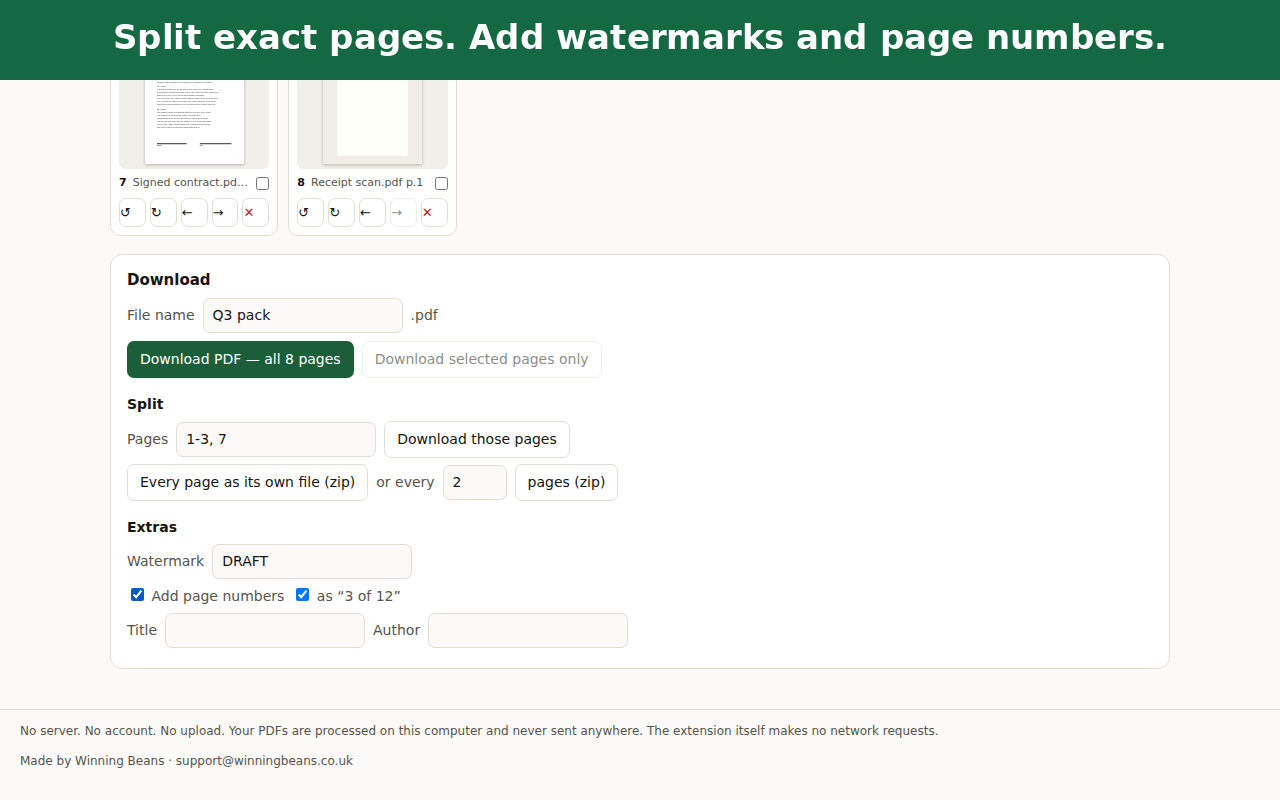
Start with this eight-page fictional sample. In Split, type 1-3, 7 and choose Download those pages. The result has four pages in that order. Open both files to check the example yourself.
Before: eight-page sample PDF · After: selected four-page PDF
- No daily limit. Not on core PDF downloads, files or pages. The core tools are free.
- Optional Pro, £14 a year. PNG-page export (up to 100 pages per zip) and text extraction (.txt, not OCR). All core tools stay free. Terms and refunds.
- No upload. PDFs are opened and rewritten inside your browser. There is no server and no account.
- No access to your browsing. The extension cannot read the web pages you visit. Free use makes no network requests; activating, rechecking or removing a paid Pro key contacts Lemon Squeezy, without sending your files.
What it does
- Merge several PDFs into one, in the order you choose.
- Split by typing pages, such as “1-3, 7”, or by ticking them.
- Rotate, reorder by dragging, and delete pages, with thumbnails before you download.
- Add a watermark, page numbers, and the file’s title and author.
Help and privacy
Support covers files that will not open and very large files. The privacy policy explains what happens to your files and Pro licence: your files never leave your computer.
PDF Toolkit is made by Winning Beans, United Kingdom. Questions: support@winningbeans.co.uk